Genesis Company Brain Compiler

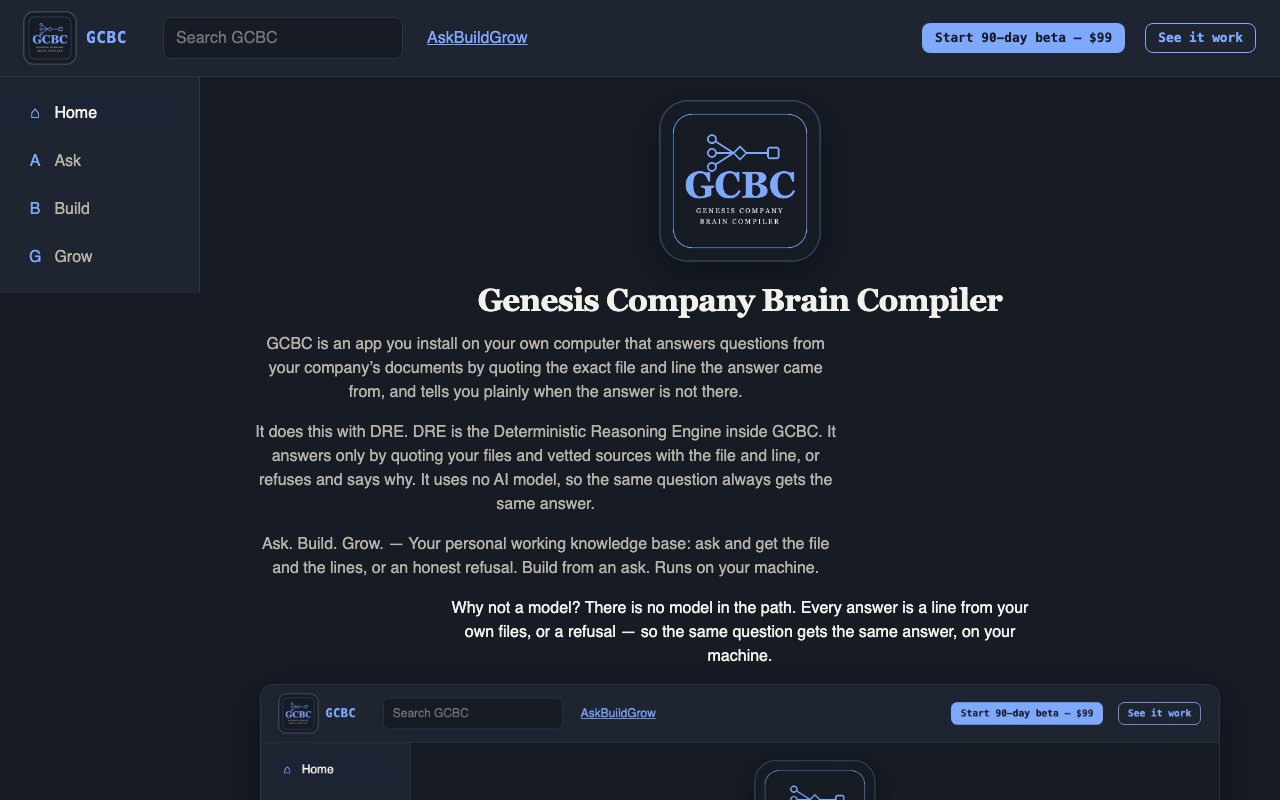
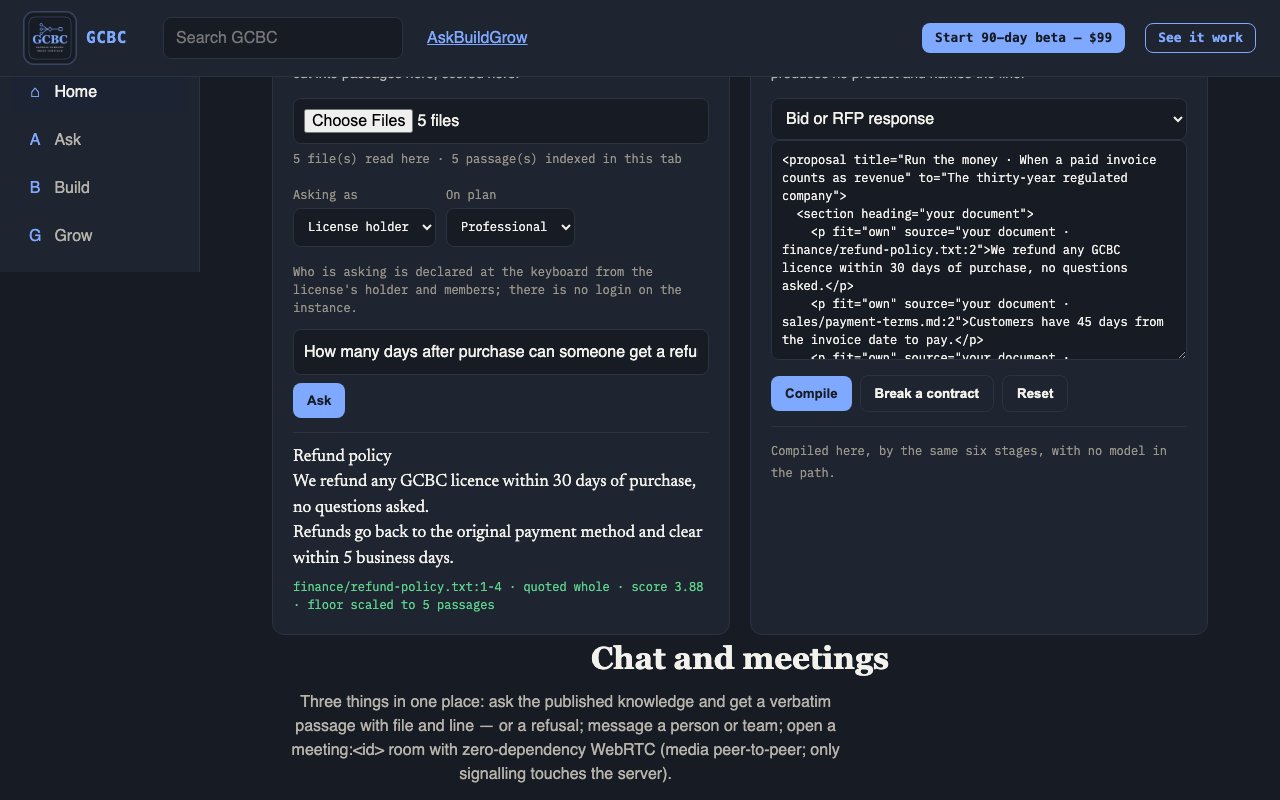
GCBC is an app you install on your own computer that answers questions from your company’s documents by quoting the exact file and line the answer came from, and tells you plainly when the answer is not there.

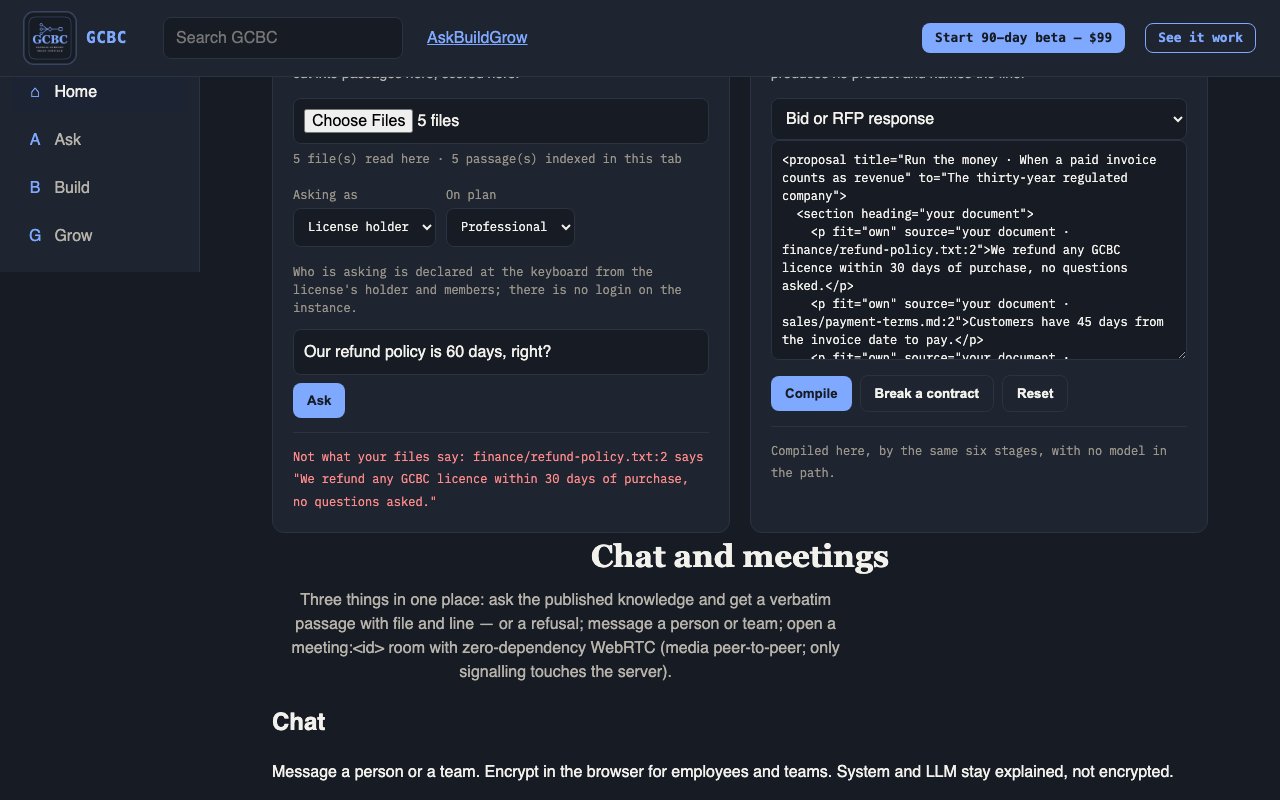
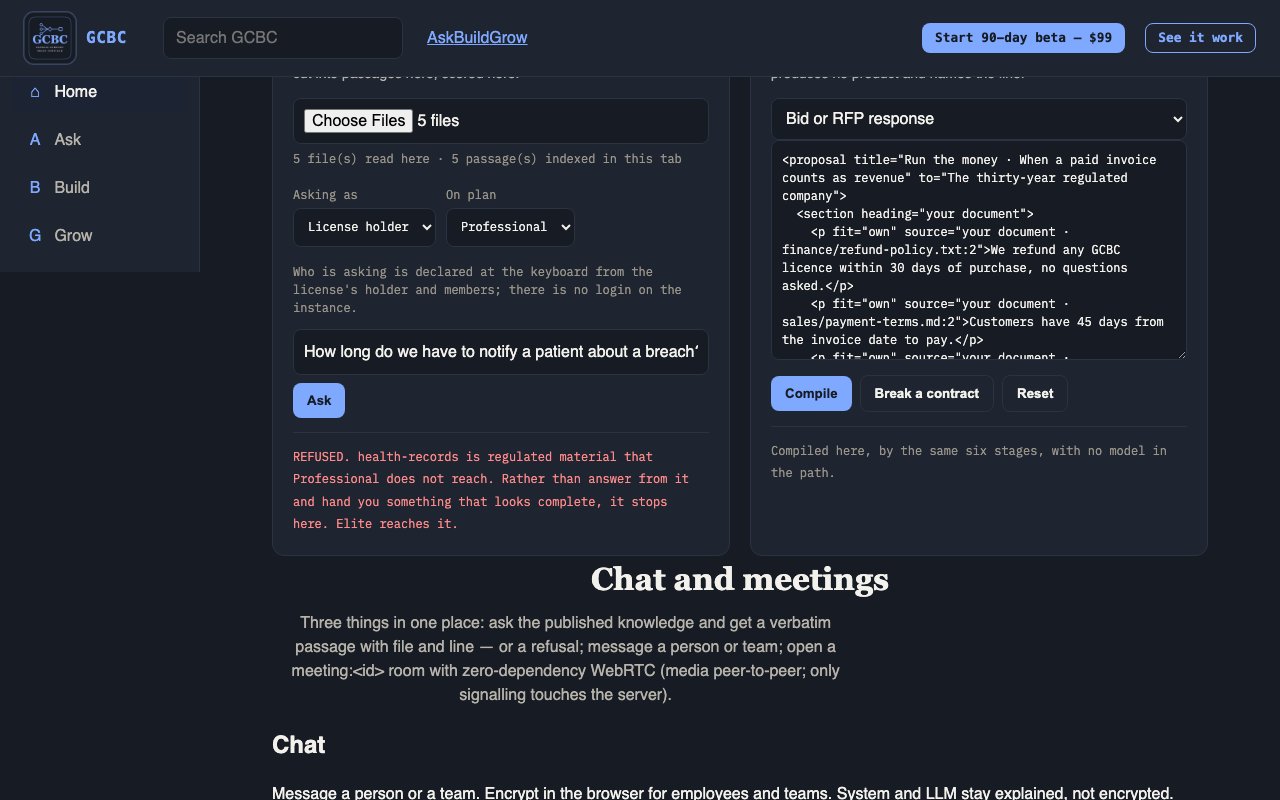
It does this with DRE. DRE is the Deterministic Reasoning Engine inside GCBC. It answers only by quoting your files and vetted sources with the file and line, or refuses and says why. It uses no AI model, so the same question always gets the same answer.

Organization, speed, provenance: it answers from your own files with the line the answer came from, and compiles what you declare — on your machine, same input, same bytes.

Why not a model? There is no model in the path. Every answer is a line from your own files, or a refusal — so the same question gets the same answer, on your machine.

  1. Runs in the tab — The counter shows every request this page makes: zero.
1 / 10 · Runs in the tabThe counter shows every request this page makes: zero.
Franchise product
GGenesis Company Brain CompilerThe franchise — ask and build from your files$PlansIndividual, Professional, Elite!Honest limitsWhat we do not claim+Get startedBeta, Mini, waitlist
What you can expect
?Answers with the line they came fromAsk anything your company has written; same question, same answer, every timeLNothing leaves your machineNo model, no account, no phone-home — measured as zero outbound requestsBDeclare it, get the artifactA broken contract produces no artifact and names the line that brokeCOne layout everywhereOrganize, ask and build from the same Command screen on every surface$Your plan, visibleUser limit, library and provenance rail read from your license!What we do not claimNo efficacy or outcome promises; unbuilt kinds are named, not sold
The company
+What we doLearning, Labs, ConsultingODomainsEducation, Finance, AI & Engineering, Life SkillsiAboutWhat we sell, how it is built, whoMCALEThe measurement engine — available now@CareersWork with us
Company front door · GCBC is the franchise · Lab products coming soon

What GCBC fixes for you

Find the one that sounds like you.

The new business owner

The problem: You are building a company and starting to hire. A drive full of work with no order to it, and nothing you can hand someone on their first day.

What changes with GCBC: Compile the operating notes and the first-day handbook you have never had time to write, out of the drive you already have — every line pointing at the file it came from, and rebuilt the same way each time it changes. Ask across it as you go. Room for 3 users — the first people through the door.

The plan that fits: Individual

The solo professional

The problem: You work for yourself, and what you send out carries your name. Years of client work, proposals and research in folders only you can navigate.

What changes with GCBC: Compile the proposal, the report, the case study — and every claim in it points at the line in your own material that produced it. Build it again next quarter and it comes out identical. Nothing is invented: where the material is not there, it refuses rather than filling the gap.

The plan that fits: Individual

The fifteen-year company

The problem: You are ten to forty people, fifteen years in. Share drives nobody has audited, and knowledge that lives in a handful of heads.

What changes with GCBC: Your own material blended with the whole vetted library, company building and the sciences, and access for everyone who needs it.

The plan that fits: Professional

The thirty-year regulated company

The problem: You are thirty years in, regulated, and everything you publish gets examined. Provenance obligations on every claim that leaves the building.

What changes with GCBC: An expired source in a regulated domain refuses the build by name. The regulated library walls (coming), the quarterly digest, and a named contact instead of a form.

The plan that fits: Elite

The developer

The problem: You build software, and you want what it says to be checkable. Your own documentation, release notes and specs, and code that makes claims about them.

What changes with GCBC: From your own code, on your own Mac, ask GCBC over its local HTTP API or its MCP server and get back the file, the lines and the exact quote behind a claim, or a refusal that names its law.

The plan that fits: Individual

The team that connects an LLM to DRE

The problem: Your team already works with an LLM. Answers that sound right, with nothing to check them against.

What changes with GCBC: Connect the LLM your team already uses to DRE, over MCP, so its answers quote your files by name and line or decline.

The plan that fits: Professional

Plans and prices

Every plan is the same app with every feature listed below. Plans differ in how many people can use it and how much of our vetted library it reaches. Each plan also includes a number of answer checks a month. A verification is one answer that DRE checks against your files, sentence by sentence.

Individual

$299 a month or $2,990 a year

Up to 3 users

Your own documents only; no vetted library

450 verifications a month included, then $0.01 for each extra verification

Professional

$2,499 a month or $24,990 a year

Up to 25 users

Your documents plus 18 vetted library domains

3,750 verifications a month included, then $0.01 for each extra verification

Elite

$4,999 a month or $49,990 a year

Unlimited users

Your documents plus 18 vetted library domains

7,500 verifications a month included, then $0.01 for each extra verification

Or start with the 90-day beta for $99.

Download and first run, click by click

After you buy, an email arrives with your license key and the download link for gcbc-1.0.0.zip. Then:

Start on a Mac with Apple silicon (M1 or later)
  1. Read the email. After checkout an email titled "Your GCBC license key" arrives. It holds your license key (a long block that starts with GCBC1.), a License ID for support (not the key), who it is licensed to, how many seats you can grant, the term, a download link with its checksum, and license.json attached as a second copy of the same license.
  2. Download and open the zip. Download the zip from the link in the email and double-click it. You get three things: GCBC, GCBC for Windows and Start Here.pdf. Drag GCBC into your Applications folder.
  3. Open GCBC. Double-click GCBC. It is signed with a Developer ID and notarized by Apple, so macOS checks it and lets it open. The first time, macOS may ask you to confirm that you want to open an app you downloaded.
  4. The welcome page opens. Your browser opens a page headed Welcome to GCBC, with a box for your key and an Activate button. The page is served by GCBC on this computer only.
  5. Paste your key. Copy the key from your email, paste it into the box and click Activate. It is checked on this computer against the key built into GCBC, and the page says Activated.
  6. Answer the eight setup questions. Reload the page. It is headed Before the board: eight questions, about your company, domain and first outcome. Answer them and click Save and open the board.
  7. Add your documents. On the board, click Add documents… and choose a folder. GCBC reads every file it can in that folder; a progress bar shows how far it has got, and the status line says Done. with the counts when the index is ready.
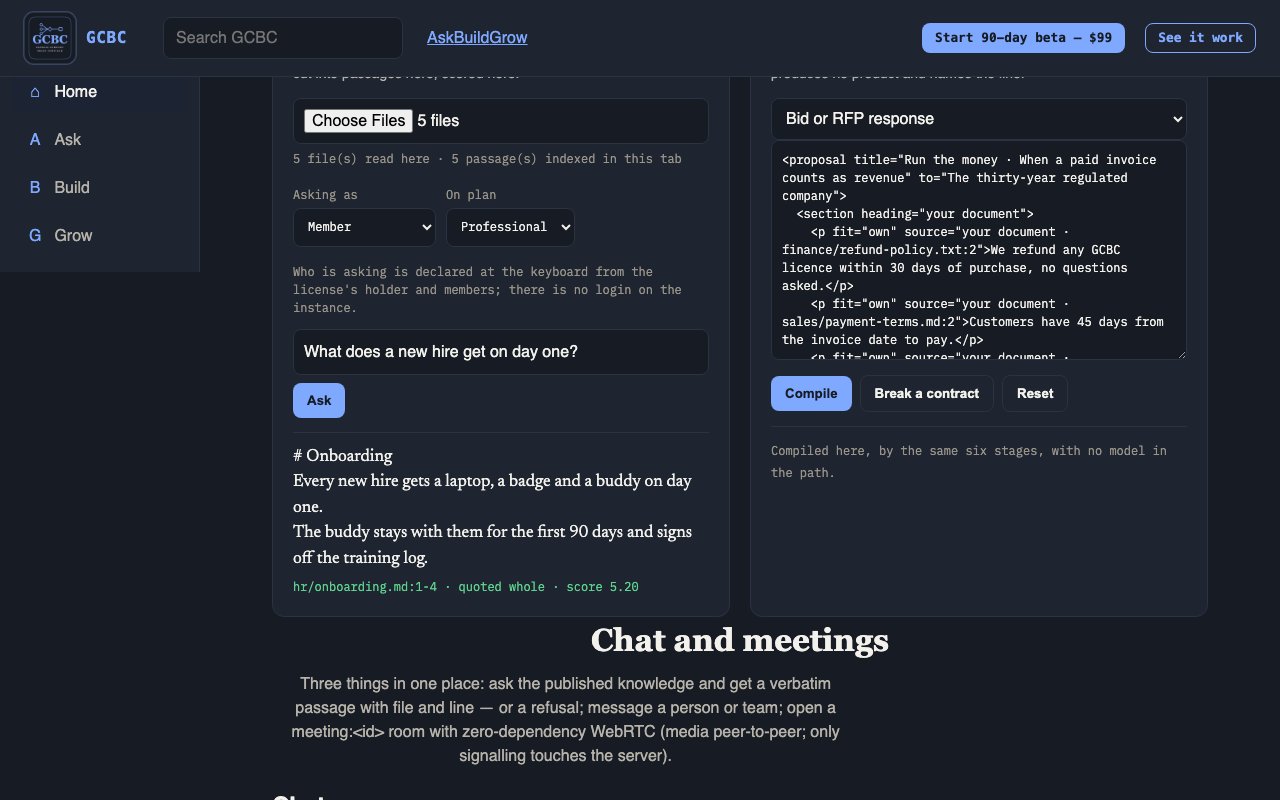
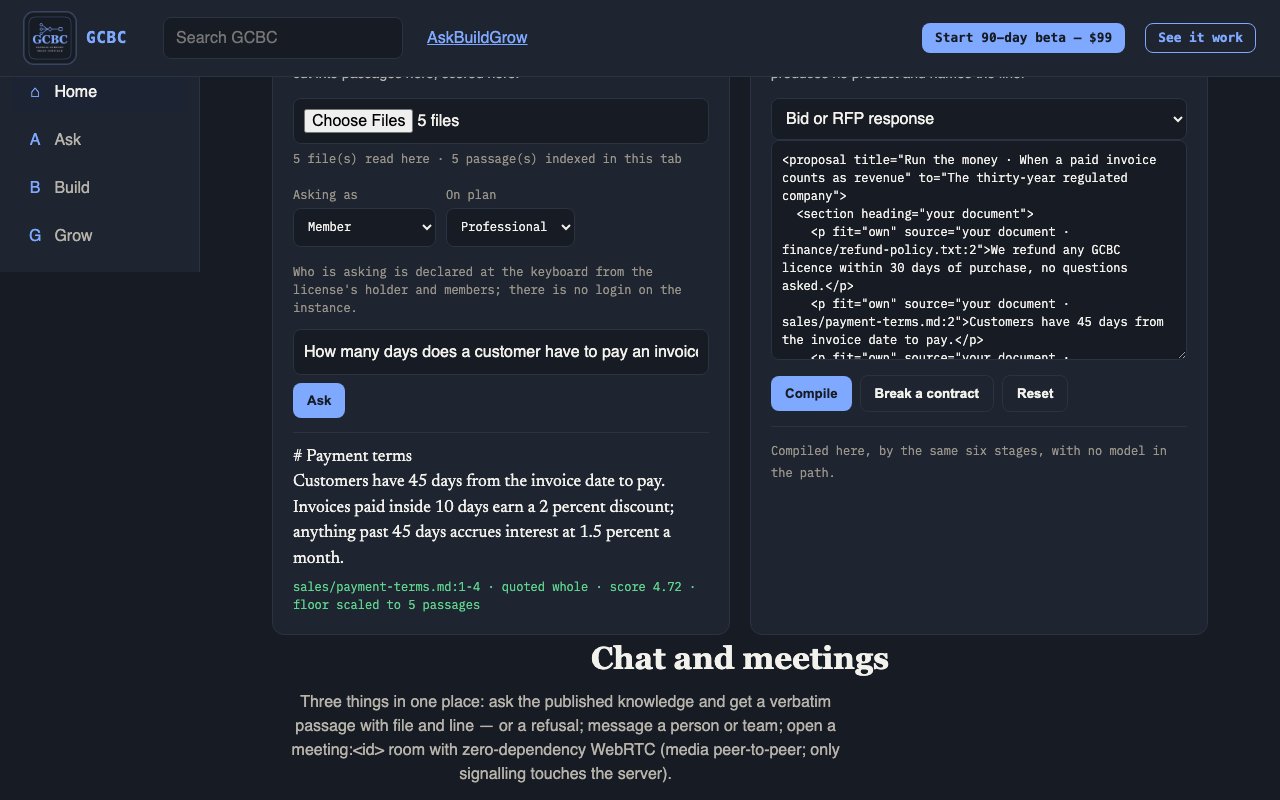
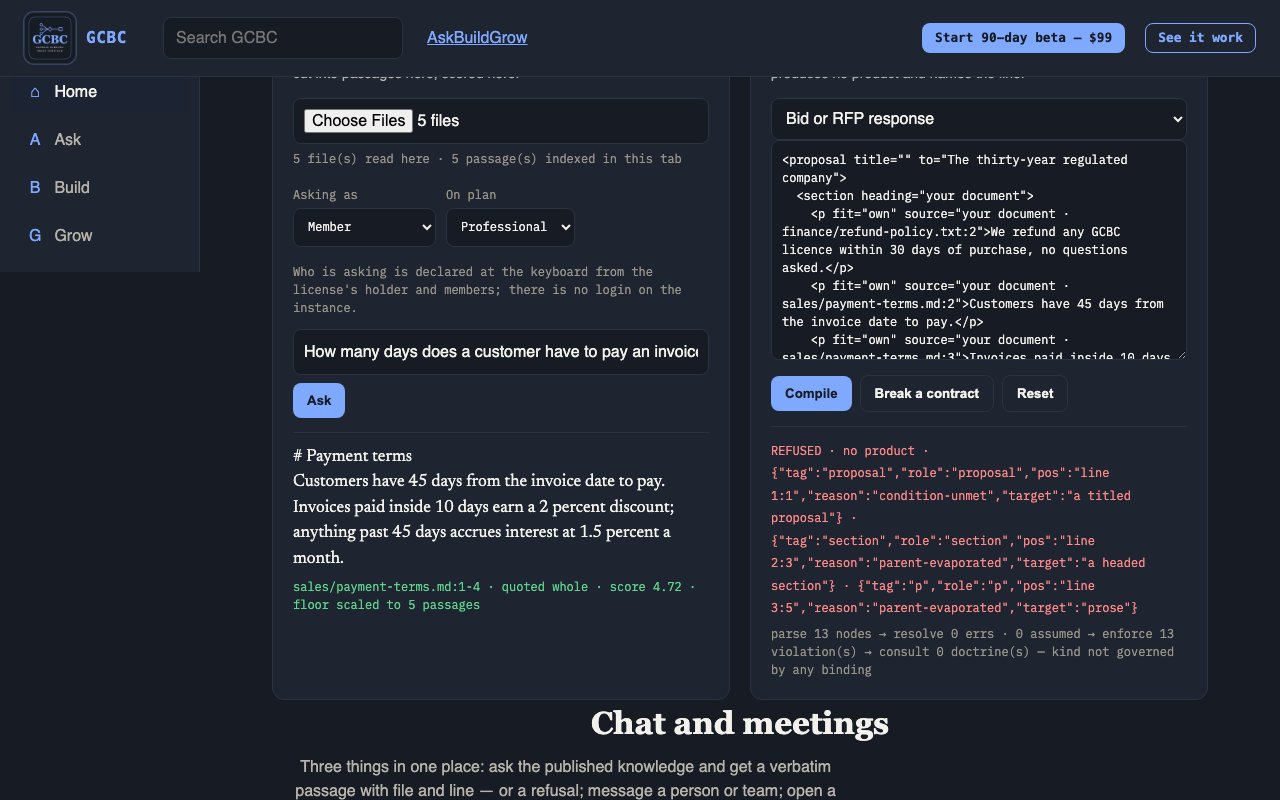
  8. Ask your first question. Type a question into the ask bar and press Enter. The answer is a passage quoted from your document, word for word, with the file name and line numbers beside it, marked your document.
Start on an Intel Mac

The same GCBC app runs on a Mac with an Intel processor; there is nothing separate to download.

  1. Double-click the zip you downloaded and drag GCBC (GCBC.app) into your Applications folder.
  2. Double-click GCBC. Its launcher (GCBC.app/Contents/MacOS/GCBC) asks the Mac whether it has Apple silicon and, on an Intel Mac, starts the Intel runtime built into the app (GCBC.app/Contents/Resources/runtime/darwin-x64/bin/node). The first time, your Mac may ask you to confirm that you want to open an app you downloaded.
  3. Your browser opens the GCBC welcome page. Paste the license key from your GCBC email and click Activate; the key is checked on this computer against the public key inside the app (GCBC.app/Contents/Resources/gcbc-license-public.pem).
  4. Answer the setup questions (the app carries them in GCBC.app/Contents/Resources/setup-questions.json), then click Add documents… on the board and choose a folder.
  5. Command line (optional), in Terminal: cd /Applications/GCBC.app/Contents/Resources, then ./runtime/darwin-x64/bin/node gcbc.mjs kinds to list what it can build.
  6. Type a question about your documents into the ask bar and press Enter. You get the passage quoted from your file, with the file name and line numbers, or a plain refusal that says the answer is not in your files.
Start on Windows
  1. Right-click the zip you downloaded and choose Extract All… (running GCBC from inside the zip does not work). You get GCBC for Windows, GCBC.app (the Mac app; a Windows PC ignores it) and Start Here.pdf.
  2. Open the GCBC for Windows folder and double-click GCBC.bat. If SmartScreen shows “Windows protected your PC”, click More info → Run anyway. It starts the Windows runtime inside the folder (app\runtime\win-x64\node.exe).
  3. Your browser opens the welcome page at http://127.0.0.1:8787/. Paste the license key from your GCBC email and click Activate; the key is checked against the public key inside the folder (app\gcbc-license-public.pem).
  4. Keep the black window titled GCBC (from GCBC.bat) open while you use GCBC; closing it stops GCBC. Double-click GCBC.bat again to reopen; if GCBC is already running, your browser simply comes back to it.
  5. Command line (optional), in the GCBC for Windows\app folder: runtime\win-x64\node.exe gcbc.mjs kinds lists what it can build.
  6. Type a question about your documents into the ask bar and press Enter. You get the passage quoted from your file, with the file name and line numbers, or a plain refusal that says the answer is not in your files.

Connect your LLM to DRE

If you already use an LLM in an app such as Claude Desktop or Cursor, you can connect it to DRE. The LLM can then look things up in your files through DRE and have its answers checked against them, instead of answering from memory.

  1. Open Terminal on a Mac, or Command Prompt on Windows, in GCBC’s folder: cd /Applications/GCBC.app/Contents/Resources on a Mac, or the GCBC for Windows\app folder on Windows.
  2. Run ./runtime/darwin-arm64/bin/node gcbc.mjs mcp --config (Apple silicon), ./runtime/darwin-x64/bin/node gcbc.mjs mcp --config (Intel Mac) or runtime\win-x64\node.exe gcbc.mjs mcp --config (Windows). It prints a short entry for your LLM app.
  3. Paste that entry into your LLM app’s MCP settings (Claude Desktop: claude_desktop_config.json; Cursor: .cursor/mcp.json) and restart the app.
  4. DRE’s tools now appear in your LLM app. Ask the LLM something about your documents.

What each tool does

  • list_sourcesLists every file DRE has indexed on this computer and whether your plan reaches it.
  • get_claimsFinds the passages in your files that answer a question, each with the file, the lines and the exact quote, or refuses and says why.
  • verify_claimChecks one sentence against your files: it returns the lines the sentence rests on, or a refusal that names the rule it followed.
  • verify_answerChecks every sentence of a whole answer: cited (with the file and line), contradicted (your file holds a different number or date), or no source.

DRE runs on your computer and opens no network port for your LLM app. The entry you paste holds no password and no key.

When you connect an LLM to DRE, the passages DRE returns to it are sent to that LLM's company, under your account with them. GCBC itself sends none of your files or answers anywhere; once a day it downloads a signed list of updates and revoked licenses from reaveslabs.ai.

Everything you can do in GCBC

Three parts: Ask, Build and Grow. Open each one to see every feature, who it is for, what it does and how to use it.

Organize and ask (15)

Cite-or-refuse Ask

Who it is for: Any user: founder, PM, sales, intern.

What it does: A question answered with a real passage (file + line) or a clear refuse.

How to use it: Pick a scope, type a question or tap a chip, read the answer or refuse.

Scope: My files

Who it is for: The signed-in person working on their own material.

What it does: Limits answers to that person’s ingested personal corpus.

How to use it: Select My files, then ask. A refuse means it is not in your personal ingest.

Scope: Company

Who it is for: Team members the license holder added (PM, sales, intern, etc.).

What it does: Limits answers to shared company knowledge.

How to use it: New hires should start here after they are added as a user — not on an empty My files corpus.

Scope: Investor pack

Who it is for: Roles allowed to see investor-facing material (Beta / Elite).

What it does: Limits answers to the investor slice (briefs, legal, metrics, strategy).

How to use it: Separated so an intern in Company scope cannot pull fundraising material by accident. Locked on Individual / Professional.

Prompt chips

Who it is for: Anyone unsure what to type — especially new hires.

What it does: One-tap starter questions that fill the ask bar.

How to use it: Tap a chip → question fills → send. Chips do not invent answers; they only propose good questions.

Ingest (Desktop, folder, or file)

Who it is for: License holder or anyone allowed to bring material in — on every plan.

What it does: Indexes Desktop, a chosen folder, or uploaded files so Ask/Build can cite them. Any readable file type DRE supports. This is also the first of the two ways to bring in your tools, "local files and exports": choose a sync folder (Google Drive, OneDrive, SharePoint, Box) or a vendor export (Gmail Takeout mail, Notion, Slack, Confluence, Jira, saved Outlook .eml mail) and GCBC reads it on your computer.

How to use it: Ingest Desktop, Choose folder, Add folder, or upload files; watch progress; stop if needed. For a cloud service, choose its sync folder itself, not your whole home folder. GCBC lists every file it could not read, by name, with the reason (Outlook .pst, .olm and .msg files are not read yet, so save messages as .eml). Your documents and index stay on this computer.

Connectors (every plan)

Who it is for: Connectors on every plan: Beta, Individual, Professional, Elite and enterprise. No plan gates a connector.

What it does: Brings in information from services you already use, beyond your desktop. GCBC connects to each service's existing connector and only reads: pull-only and read-only, and it never changes anything in the service. Live today: Outlook mail, Outlook Calendar, OneDrive, SharePoint and Microsoft Teams, including meeting transcripts (all Microsoft 365, read-only); Notion; HubSpot; an Obsidian vault; and folders on this computer.

How to use it: Open Connectors on the board, pick the service and press Connect. You sign in inside the app with your own account for that service: Microsoft 365 shows a Microsoft sign-in code in the app; Notion and HubSpot ask for your own access key, with a link to where to get it. The first time, GCBC downloads that one connector at a pinned, checked version. Copies land in your GCBC folder on this computer. Disconnect ends it.

Connectors coming next

Who it is for: Anyone whose service is not live yet. When one arrives it is on every plan, like the rest.

What it does: The other 21 of the founder's 29 services are declared but not in the app yet, and each one says why in plain words. One of them, Zoom and Teams meeting transcripts, is half there: Teams transcripts already work through Microsoft Teams.

How to use it: Read the reason. Where it says so, choose that service's folder under Folders instead (Google Drive, Dropbox, Box), or add an export.

What stays on this computer

Who it is for: Every customer, on every plan.

What it does: "Your documents and index stay on this computer. A connector you turn on talks only to that service, using your own sign-in, and nothing is sent to us."

How to use it: The offer page now reads: "Indexing, retrieval and every answer happen on your machine. Nothing is uploaded to us and nothing syncs in the background: files come in when you add them, and a connector pulls only after you press Connect, with your own sign-in, straight from that service to your computer." Its footnote reads: "With no connector turned on, GCBC’s only network request is the once-a-day download of our public, signed update and revocation list; it carries no account, key, file or answer, and every build is tested for that. A connector you turn on talks only to the service you connected, using your own sign-in."

Corpus teaching after refuse

Who it is for: Whoever hit a refuse — often a new hire discovering gaps.

What it does: Turns a refuse into a next step: declare the missing hole in Doctrine, or ingest what was missing.

How to use it: Read the refuse, then either ingest the missing file or open Doctrine and name the hole.

Answer verification

Who it is for: Anyone checking a draft against their own files: yours, a colleague’s, or one an LLM wrote.

What it does: Every sentence of an answer gets one verdict: cited (the file, the lines and the exact quote), contradicted (the file and line holding a different number or date), or no source (the law that refused it). A citation proves your files hold the words, not that a paraphrase of them is right.

How to use it: Save the answer as a text file and run the command, or send it to the route or the tool.

Your LLM, connected to DRE (MCP)

Who it is for: Anyone who uses Claude Desktop, Cursor or another MCP client and wants its answers held to their own files.

What it does: A local MCP server with four tools: list sources, get claims, verify a claim, verify an answer. Every result is a citation or a refusal that names its law. GCBC has no model: the LLM is yours. DRE is the Deterministic Reasoning Engine inside GCBC. It answers only by quoting your files and vetted sources with the file and line, or refuses and says why. It uses no AI model, so the same question always gets the same answer. When you connect an LLM to DRE, the passages DRE returns to it are sent to that LLM’s company, under your account with them. GCBC itself sends none of your files or answers anywhere; once a day it downloads a signed list of updates and revoked licenses from reaveslabs.ai.

How to use it: Add the printed entry to that app’s settings and restart it. It runs on this computer and opens no port.

Chat

Who it is for: Users messaging people (not DRE).

What it does: Team or direct messages, locked on your computer before they are sent, so the relay only ever holds messages it cannot read; @brain can drop a grounded answer into a thread where supported.

How to use it: Open Chat, pick a person or team room, type and send. Every message is locked before it leaves your computer.

Encrypted sending

Who it is for: Everyone who sends a chat message.

What it does: Every message is encrypted on your computer before it is sent; the keys stay on your team’s computers.

How to use it: Nothing to switch on. Check the thread shows the right recipient before you send.

Meetings

Who it is for: Teams that need live conversation with video.

What it does: Schedule or invite by email, then start a meeting with camera when permitted.

How to use it: Schedule or invite → join/start → grant camera/mic when the browser asks. For a group meeting, the account holder first starts GCBC's meeting server (gcbc media start) and shares the address gcbc media status prints.

Build and prove (16)

Sources

Who it is for: Builders and license holders maintaining what may be cited.

What it does: The registry of domains and sources DRE is allowed to use.

How to use it: Open Sources; review domain counts and registered material. Unregistered files cannot enter a compile.

Doctrine

Who it is for: Founders and operators who settle rules.

What it does: Numbered laws gates and refusals trace to.

How to use it: Open Doctrine; read or declare settled rules the compile may treat as true.

Sandbox

Who it is for: Anyone trying a build safely.

What it does: Compile a kind from sample/edited XML without shipping.

How to use it: Pick a kind, edit XML if needed, Compile; read conforming/emitted/bytes/preview.

Ingest (in Build)

Who it is for: Same as ASK ingest.

What it does: Desktop, folder, or file upload into the shared corpus.

How to use it: Same controls as ASK: Desktop / folder / upload / progress / stop.

Ask inside Build

Who it is for: Builders checking understanding mid-compile path.

What it does: Quick cite-or-refuse against the ingested corpus.

How to use it: Type a check question; get cite or refuse.

Compile (sixty kinds / ten categories)

Who it is for: Anyone producing a deliverable their plan allows.

What it does: Turn a declaration into a finished artifact or a named refusal.

How to use it: Choose kind, satisfy required fields, compile; refuse names the break if something is missing.

Prove

Who it is for: Anyone who must show evidence to a stakeholder.

What it does: Live pack: chain health, registry size, recent compiles.

How to use it: Open Prove; read chain/registry/product rows.

What shipped

Who it is for: Builders tracking real outputs.

What it does: Artifacts that actually compiled onto disk.

How to use it: Open the list; open an artifact by kind/id when present.

System health

Who it is for: Operators checking whether the instance is fit.

What it does: Live counts: chain, kinds, registry, entitlement.

How to use it: Open and read green/red counts.

Index fingerprints and replayable receipts

Who it is for: Anyone who must show later where an answer came from: an auditor, an investor, the license holder.

What it does: A cited answer can be saved as a receipt: the claim, the file, the lines, the quote, the file’s hash, the index fingerprint and the engine version. Replay re-checks it offline and says whether it still holds, what changed if not, and whether the index is still the one it came from. The fingerprint is recomputed from the approved files on disk, never read back.

How to use it: Save the receipt with the answer; run replay on it whenever it matters.

Security hash chain

Who it is for: Anyone verifying tamper-evidence.

What it does: Linked action trail with live linkage verdict.

How to use it: Open chain view; inspect entries, broken links, head.

Connector safety and download checks (S7 and S6)

Who it is for: Automatic. It applies to every customer download before it ships.

What it does: Two gates. S7, the connector safety rule, is ratified: a connector installs only from the exact pinned versions shipped in the download (lockfile-only installs); the app accepts a change only from its own page (strict Origin and anti-forgery checks); each connector declares the addresses it talks to and the settings it may receive; and GCBC calls only a declared list of read-only actions (a read allowlist). S6, the check that no signing secret ships in the download, is green on this release, and S7 passed on both downloads.

How to use it: A download that fails either gate is not published. Your sign-in details are kept on this computer (the Mac Keychain, or a private file in your GCBC data folder), never in a log and never in the download.

Rebuild-check quotes

Who it is for: The compile path itself (automatic).

What it does: Reopens passages from disk and compares; drift stops the build.

How to use it: You see it as a refuse/stop when a source changed under you.

Four-quadrant proving ground

Who it is for: Learners and operators stress-testing the compiler story.

What it does: Input → Build → Generate → Project with break-any-stage demos.

How to use it: Run stages; break one on purpose; watch later stages produce nothing.

Vetted library / Blend / Add sources

Who it is for: Professional, Elite, and Beta (Elite reach). Individual: no library.

What it does: Curated domains; blend your facts with library facts; permanently add your sources.

How to use it: Use library domains your plan unlocks; blend in one deliverable; add sources permanently on Pro+.

Regulated domains + freshness

Who it is for: Elite and Beta get the full regulated library. Individual gets the regulated walls too, but only the ones its setup answers open; its vetted library stays at zero. Professional does not include regulated domains.

What it does: Privacy/finance domains (the health-records, minors and financial-advice walls). On Elite and Beta, every build re-checks freshness; expired blocks ship.

How to use it: Compile against regulated material only where your plan and your answers open it; fix expired sources before ship.

Grow the company (11)

Add members / user limits

Who it is for: License holder (and roles allowed to invite).

What it does: Invite teammates by email up to your plan's user limit: Individual: 3 · Professional: 25 · Elite: unlimited.

How to use it: Enter email, invite; they appear in the user list as people or reserved slots.

Library reach

Who it is for: Anyone checking what their plan can cite.

What it does: Shows unlocked vetted-library domain count (0 / 9 / 18).

How to use it: Open Library reach / Sources and read domain unlocks.

Your company

Who it is for: Users viewing the org snapshot.

What it does: Customer-safe summary: you, users, onboarding.

How to use it: Open the cards; no AI dump of private VP material.

Approvals

Who it is for: Founder/approvers with pending decisions.

What it does: Proposals and held items waiting on approve/reject.

How to use it: Open list; act on pending items.

Your plan

Who it is for: Buyer / license holder.

What it does: Individual / Professional / Elite (and Beta window) with user limits and library caps.

How to use it: Open plan stage; compare tiers; billing actions only when real Stripe binding exists.

Investor pack

Who it is for: Beta / Elite roles with unlock.

What it does: Open investor docs from the investor room.

How to use it: If unlocked, browse docs; if locked, clear refuse naming the plan.

Quarterly digest

Who it is for: Elite / Beta service recipients.

What it does: Written digest of what moved in your domains — delivered, not only requested.

How to use it: Receive/open the digest for your domains.

Priority queue and named contact

Who it is for: Elite / Beta customers needing faster build access.

What it does: Priority build queue, early access to new kinds, named contact instead of only a form.

How to use it: Use the priority path; contact the named person.

Outward claims and refusals

Who it is for: Anyone writing marketing or sales copy.

What it does: Allowed vs forbidden external claims.

How to use it: Read allowed/forbidden lists; do not ship forbidden lines.

Chat (from Grow)

Who it is for: Same as ASK Chat — team messaging entry from Grow.

What it does: Same human messaging surface.

How to use it: Same as ASK Chat.

Get in / access

Who it is for: Prospects and new licensees.

What it does: How someone starts: license activation, Beta, web plans, with no fake checkout in the download. The GCBC Mini is retired and no longer sold. Release r5 is live, and the download is a double-click app: GCBC.app for Mac, GCBC for Windows, and Start Here.pdf, nothing else. It opens with a double-click; no terminal.

How to use it: Mac: double-click the zip, drag GCBC into Applications, double-click GCBC (the first time, allow it once under Privacy & Security). Windows: open GCBC for Windows and double-click GCBC.bat. The browser opens the welcome page; paste the license key from the email and click Activate. Four steps, about two minutes.

Home

The company compiler — turn what you know into what you sell.

Properties

The company compiler — organization, speed, provenance

Turn what you know into what you sell.

Hundreds of folders on your desktop and you still can’t find anything? Point GCBC at what you already have and get back an organized company you can ask — one that builds what you sell and sources every answer. Your AI, with no LLM needed — no chatbot guessing at words.

Reaves Labs & Learning builds products people learn with, tools we build and run, and engagements you can hire us for — across Education, Finance, AI & Engineering, and Life Skills. Our franchise product is the Genesis Company Brain Compiler. Everything else on this page is either built on it or waiting behind it.

Individual $299/month · Professional $2,499/month · Elite $4,999/month

What it is, and who it is for

GCBC

The franchise product — ask and build from your files.

Properties

GCBC

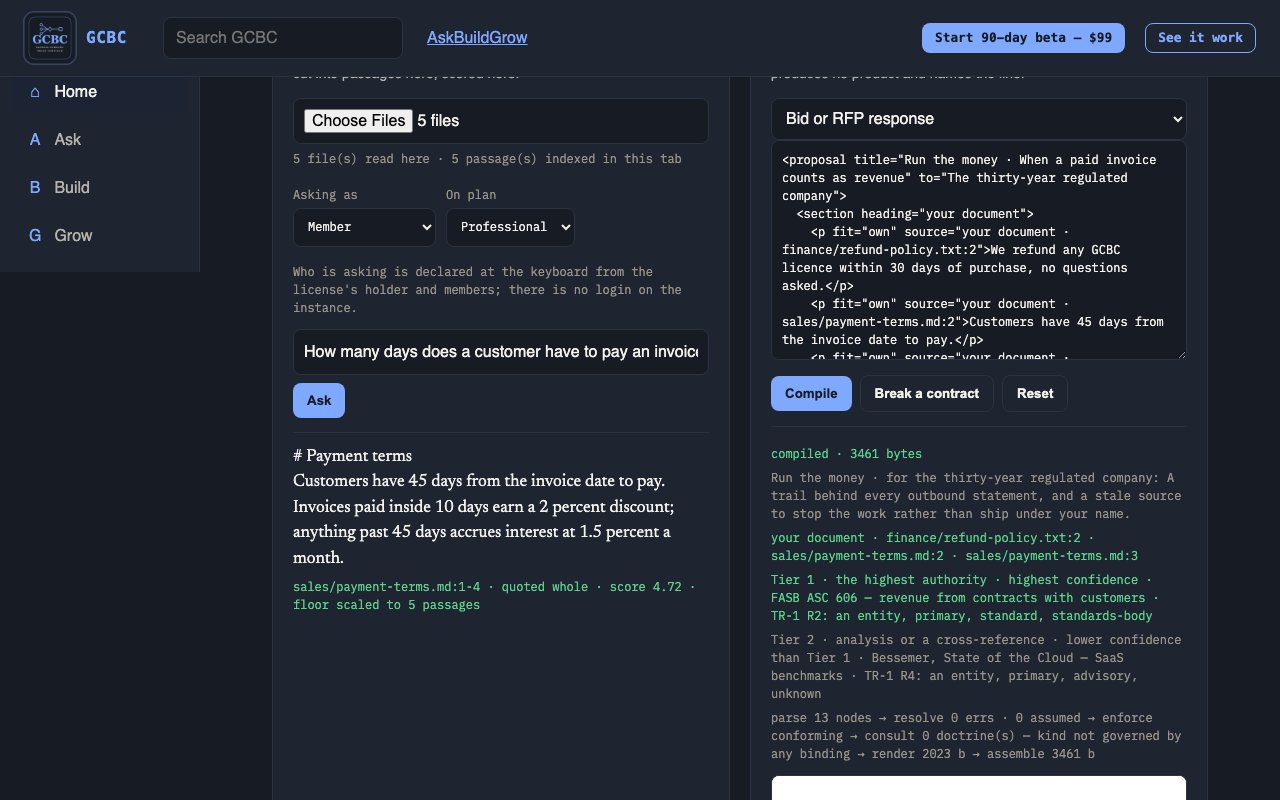
A local, two-part compiler. It ANSWERS questions from your own corpus with the file and line the answer came from, and it BUILDS finished artifacts by compiling declared XML nodes. One board renders both.

Half one · it answers

Ask it anything your company has declared

The answer is a verbatim line out of your own corpus, with the file and the line number it came from — or an honest refusal. There is no model call on that path.

Half two · it builds

Declare a node, get a finished artifact

Apps, decks, whitepapers, landing pages. A violated contract does not produce a worse product — it produces no product, and names the line that broke.

Declaration is originThe XML node is the source; compiling is a transform, not a generation. [LAW 0]
Nothing is authored twiceA fact lives in exactly one place, and every surface that shows it reads it from there.
A green needs a redEvery check carries a twin that must be able to force it red. A checker never forced to fail is measuring nothing. [TWIN LAW]
14 surfaces, 3 groups
  • Chat Company brain
  • Ask the brain Company brain
  • Indexed sources Company brain
  • Doctrines Company brain
  • Chain Company brain
  • BLOOM Company brain
  • Sandbox Compiler
  • Upload Compiler
  • Generate Compiler
  • Products Compiler
  • Signals Compiler
  • Investor Compiler
  • System Founder
  • Checks Founder

Which one are you?

The new business owner

You are building a company and starting to hire. A drive full of work with no order to it, and nothing you can hand someone on their first day.

To turn what you already have into something you can hand a new starter.

Individual

The solo professional

You work for yourself, and what you send out carries your name. Years of client work, proposals and research in folders only you can navigate.

Every claim you put in front of a client to be one you can show the source for.

Individual

The fifteen-year company

You are ten to forty people, fifteen years in. Share drives nobody has audited, and knowledge that lives in a handful of heads.

To use what the company already knows, before the people who know it leave.

Professional

The thirty-year regulated company

You are thirty years in, regulated, and everything you publish gets examined. Provenance obligations on every claim that leaves the building.

A trail behind every outbound statement, and a stale source to stop the work rather than ship under your name.

Elite

The developer

You build software, and you want what it says to be checkable. Your own documentation, release notes and specs, and code that makes claims about them.

To give your code the file and lines behind a claim, or a clear refusal.

Individual

The team that connects an LLM to DRE

Your team already works with an LLM. Answers that sound right, with nothing to check them against.

Every answer the LLM gives to cite your own files, or to refuse.

Professional

How it works

Ask

your material goes in, and every answer carries the line it came from

First mile — learn your corpus

Drop a folder → ask one question → see a cite or a refuse → pick one hole to declare.

Organize

Organize is the Ask surface — same as Home A, and since 2026-09-23 the top nav carries it under the name ASK. The two words name one surface; the nav uses the one a first-time reader understands without being told. Scope chips and example chips (coming), the question bar, and the promise: if it is not in your material, it says so.

Refuse

When the answer is not in scope, GCBC refuses instead of guessing. That is the product promise on Organize and across cite paths.

Upload / ingest

Bring files into Sources so Ask and Build can cite them. Unregistered files stay out of compiles.

Master your data

Don’t just own your data. Master your data. Own means files on your hardware. Master means doctrines declared, conflicts named, and judgment compiled you can prove. Cite teaches the corpus; refuse is the syllabus; declare the hole in Build.

Chat and meetings

From Home open Chat and meetings (C). Message a person or team. Schedule a meeting, invite by email, start with camera when ready.

Meetings

Inside Chat and meetings: set title and time, invite emails, schedule, then Start meeting. Local and far peer panes prove the media path when permissions allow.

Scopes — what a question is allowed to reach

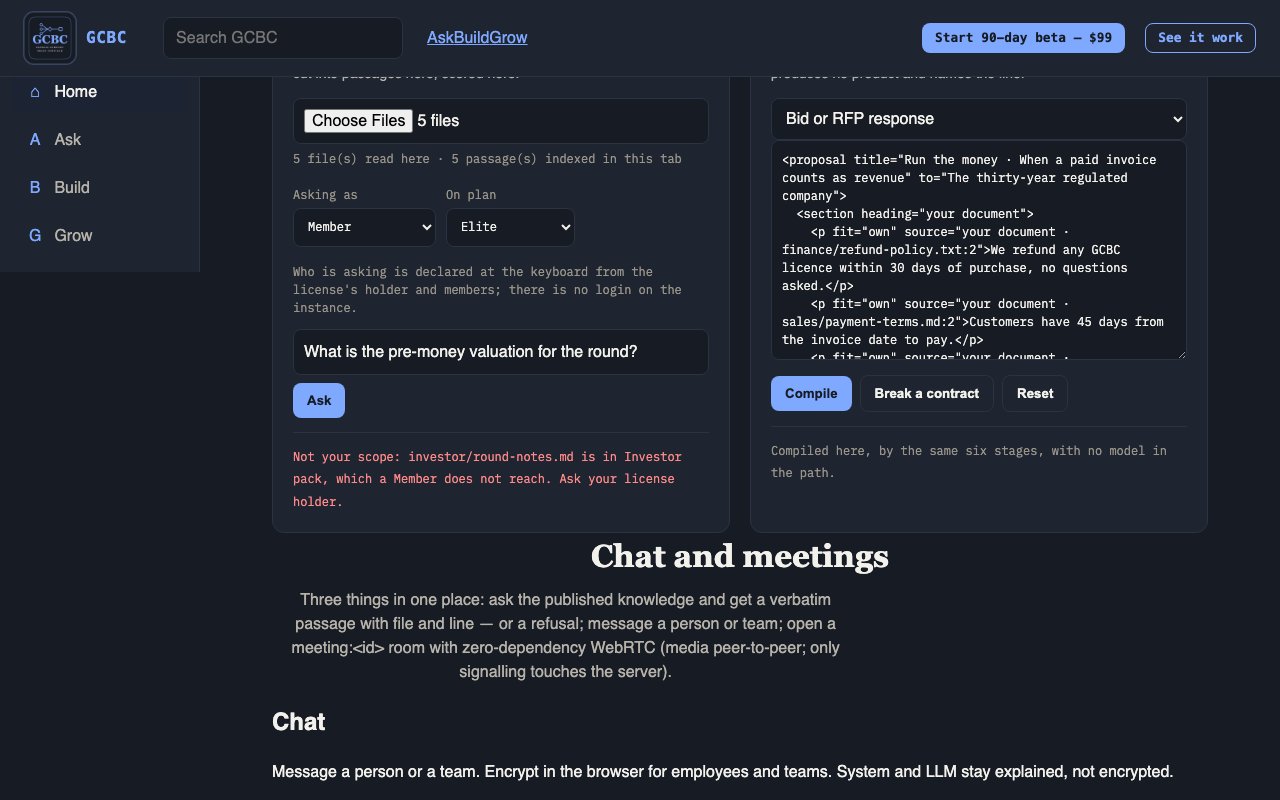
Every question runs inside one scope — the chips above the ask bar are coming; today the scope is the folder the passage came from. My files limits answers to your own ingested material — drafts, notes, private working files — and a refuse there means it is not in your personal ingest (choosing it on the board is coming). Company limits answers to shared company knowledge; new hires should start here after they are added as a user, not on an empty My files corpus (choosing it on the board is coming). Investor pack limits answers to the investor slice — briefs, legal, metrics, strategy — and is LOCKED on Individual and Professional (choosing it on the board is coming). The separation is deliberate: an intern in Company scope cannot pull fundraising material by accident.

Build

declare it, compile it, prove it — and nothing ships until you say so

Build and prove

Open Build (B). Work Sources → Doctrine → Sandbox, then compile a deliverable. Nothing ships until you say so. Every build leaves a receipt you can check.

Sources

Registered material the compiler may cite. Open from Build or Home L. Your files and plan library domains live here.

Doctrine

Under Build, Doctrine is the numbered list of settled rules the compiler treats as true. Every refusal names the rule it traces to, and you can declare a rule of your own; it is kept on this computer and numbered after the others. It sits with Sources and Sandbox as proof behind a deliverable.

Sandbox

Under Build: try safely. The Sandbox compiles a kind from its declaration, which you can edit there, and shows whether it conforms, what it would emit and a preview. Nothing is written, so What shipped does not change; a Build is what ships. Pair it with Sources and Doctrine for proof.

System health

Under Build: what this copy holds right now, counted from the files on this computer each time it loads — whether the record of every action is intact, how many passages and files are indexed, what is on disk, the rules in force and your plan. It reports on the machine, not on your documents, so reading it tells nobody anything about your material.

Rebuild check

Compile the same declaration twice and compare the bytes. A deliverable that cannot be rebuilt identically cannot be re-derived from its sources later, which is the whole claim — so the check runs on the artifact you are about to ship, not on a sample.

Search GCBC

The sticky top search is for finding Command surfaces and copy quickly. It does not replace Ask from sources.

Ask inside Build

Builders checking understanding mid-compile path: a quick cite-or-refuse against the ingested corpus, after ingest and before or after sandbox tries. Type a check question at BUILD → Ask step; get a cite or a refuse. It is the same promise as the Ask pillar, available without leaving the build.

What shipped

Builders tracking real outputs: the artifacts that actually compiled onto disk from a Build. A sandbox compile writes nothing, so it never appears here. Open BUILD → What shipped and open an artifact by kind or id when present. A compile that produced nothing appears nowhere — the list is what exists, not what was attempted.

Grow

user limits, library reach and approvals — then the proof, and what it costs to grow into

Members / user limits

Home row T (Add members) opens Grow’s user-limit path. Invite by email up to your tier's user limit; the limit for each tier is read from the license and shown on Your plan, never typed here (founder t591u — Beta treated as Elite full system view, unlimited users).

Users and snapshot

Under Grow: who currently has access, and a point-in-time snapshot of what the company brain looked like on a date. A user sees the snapshot for their own scope, which is how a new joiner reads history without being handed the whole corpus.

Saved summaries

An answer you keep. A summary is saved with the sources it was built from, so reopening it later shows the same cites rather than recomputing against material that has since moved. Saved summaries carry the scope they were made in and travel no further.

What a member can reach

A user reaches the scope its license holder granted and nothing beyond it. There is no dump of a company's private material to a member who was not granted it, and no cross-company reach at all: ask something outside your scope and it refuses by name rather than answering from material you were never given.

Plan (tiers)

Your plan (P): Individual, Professional, Elite — user limits and library grow with the plan. Copy and CTAs come from offer plan-* properties. Checkout only when Stripe is bound.

Outward claims and refusals

For anyone writing marketing or sales copy, before publishing a landing page or a pitch: the allowed external claims and the forbidden ones, as two lists. Read them and do not ship a forbidden line. The register is the same one the build gates read, so a claim that would be refused in a deliverable is refused in a headline.

How you check what it did

The customer's request is shown back to them as the transform received it. A request that is silently rewritten before compiling cannot be checked against its result.

Every source the transform drew on is named to the customer, with the file and line it was read from. A count of sources is not a naming of them.

Each claim in the result points at the source that produced it. Showing the answer and the source list separately satisfies neither: the customer must be able to ask "where did THIS line come from" and get one answer.

When the material is not there, the transform REFUSES and names what is missing. A refusal is a step in the derivation, not an error to be hidden, and it is the only honest alternative to inventing the middle step.

The surface presents a derivation, never a recommendation. The distinction is load-bearing: "here is how this answer was derived, step by step" is a record of what the customer's own material says; "you should do X" is advice, and this product does not give it.

What it costs

Plans

Founder-ratified tiers for GCBC.

Properties

Three ways to own it

It is the only product in the estate that is both revenue-ready and the thing every other product is compiled by. Selling it sells the method; the method builds the rest.

Individual

Build from what you already have.

$299/month

founder 2026-09-03 — "Individual $299/mo"

or $2,990 / year — Two months free

You have a folder — or a drive, or a decade — of work that has never been usable by anything. Individual turns it into something you can build from.

The solo builder, independent educator, or single-domain professional. Best for deliverables in the TENS per year.

  • Ask across everything you have written and get the answer with the file and line it came from
  • On a local Gumroad instance: runs offline on your own hardware, bound to loopback. On hosted Command (gcbc.reaveslabs.ai): the same cite-or-refuse compiler in your workspace — not a claim that the browser tab never uses the network
  • Same request, same file: a recorded compile replays byte for byte
  • Runs with no model at all — every answer is arithmetic over an index on your own machine, which is why the same question returns the same passage every time
  • Regulated walls open when obligation predicates answer yes (health-records / minors / financial-advice walls in domains/gcbc-obligations.xml) — library count remains 0
  • The vetted source library, blending it with your documents, and adding your own sources to it. Individual builds from YOUR material. Library membership stays zero (FOUNDER t709u).
Subscribe

Elite

Current, without being asked.

$4,999/month

founder 2026-09-03 — "Elite $4,999/mo"

or $49,990 / year — Two months free

Everything in Professional, plus the full library, the regulated domains, and a service layer that keeps it all fresh without you filing a ticket.

Organizations whose work has to survive scrutiny and stay current. Best for deliverables in the THOUSANDS per year across many domains.

  • All eighteen library domains, not half
  • The regulated domains — student privacy and finance, where getting provenance wrong has consequences
  • Every source is re-checked against its freshness window on every build — fresh, stale or expired — and a library carrying an expired source will not ship at all
  • A quarterly written digest of what moved in your domains, delivered rather than requested, and a one-page currency statement on demand
  • Priority build queue, early access to new deliverable types, and a named contact rather than a form — Reaves Labs Elite Support (the Reaves Labs Elite team) at [email protected]; one accountable company team for digest/re-verify and the priority queue, not a personal founder cell
  • Nothing in the catalog. Elite is the whole library and the service layer (digest + priority queue are MUST-PROVE under t538u — not deleted).
Subscribe

Every price on this page quotes a founder ratification dated 2026-09-03 and is recorded in the offer node it is read from. No price originates on this page.

90 days for $99

Run the whole product on your own machine for 90 days for one payment of $99. Not a trial of a cut-down version and not a demo: the same compiler as Elite — all 60 kinds, full system view, unlimited users, the same refusals. One payment, 90 days, no renewal and nothing to cancel.

This one does not renew. It is a single payment for 90 days, and there is nothing to cancel. Tell us what you think of it and get 20% off any plan

What each plan reaches

The same six facts for every plan, read from the entitlement the product enforces rather than written here.

Upgrade. Move to a higher ratified tier (Individual → Professional → Elite) using live Stripe price ids from gcbc-offer.xml

Every plan starts with a 7-day free trial. No card is collected until it converts, and you can cancel inside the trial without being charged. After that it renews automatically at the price shown until you cancel.

What you getIndividualProfessionalElite
Deliverable kindsAll 60All 60All 60
Vetted libraryYour own documents18 domains · 18 with vetted sources today18 domains · 18 with vetted sources today
Library shelvesnone — builds from your own documentscompany-building + sciencecompany-building + science
Why that shelfNothing is vetted for you, so nothing can be stale on your behalf.Founder 2026-09-27 16:09 PT: "Actually give professional that too" — the full shelf, as Elite.Elite pays for the full shelf plus currency that cannot be overruled by a deadline.
User limit325Unlimited
Source freshnessManual stampsManual stampsEnforced on every build
Written digestNot includedNot includedQuarterly
Named contactNot includedNot included[email protected]

Why you can check it

Proof

Every figure with the file and line it was measured in.

Properties

A checker that has never been forced to fail is measuring nothing.

Why believe any of this? Every figure below carries the file and line it was measured in, and the sentence that says what it does not mean.

Same declaration in, same bytes out

The same request, run five separate times from a cold start, produced an identical result every time - not similar, identical to the byte.

What this does not mean: It means the BUILD is repeatable. It does not mean every screen looks the same on every visit: a page showing live status reads that status when you open it, and it will have moved on. Anyone claiming every response is always identical is overstating it.

docs/GCBC-DETERMINISM-AND-PORTS.txt:9-18

Your information stays on your machine

We scanned this installation from the surrounding office network. Every part of the compiler refused the connection - it answers only on the machine it runs on. The one service that did answer is our own local code storage, which is not part of the product.

What this does not mean: Measured on one installation, on one date. It describes how this deployment behaves, not a promise about how yours will be configured.

docs/GCBC-DETERMINISM-AND-PORTS.txt:38-53

Answers come back instantly

A typical question comes back in about seven thousandths of a second. The board's own screens draw in under two thousandths. Measured ten times each.

What this does not mean: These are measurements, not a service level. We have not committed to a speed in a contract, and we will not present a number we merely observed as one we owe you.

docs/GCBC-GRADE.txt:53-59

Every answer shows you where it came from

2,496 documents indexed, with every passage keeping the file it came from and the exact lines within it. That is what lets any answer show you its own source rather than asking you to trust it.

What this does not mean: Measured 2026-09-01. The index is re-checked before this figure is quoted, because a number about a corpus goes stale the moment the corpus changes.

domains/gcbc-tab-requirements.xml:144

Fourteen surfaces are self-contained

We walked every file behind each of the board’s fourteen surfaces and resolved every relative import. Not one reaches outside its own folder. Fourteen of fourteen.

What this does not mean: This proves the source is self-contained. It does not prove that any surface boots on its own, which is a stronger claim this test does not make. And the fourteen are the board’s tabs, not fourteen separate products — the earlier wording said both of those things and neither was measured.

docs/GCBC-PROVABILITY.txt:12-20

154 of 487 checks have been made to fail on purpose

We deliberately broke seventy of our own checks to find out which ones would notice. Eleven caught it. Fifty-nine did not, and we are publishing the list.

What this does not mean: This is the worst number we have and it is here on purpose. We refuse to combine it with a second, friendlier measurement to produce a bigger one - our own review calls that combined figure far too generous. The measurement also needs a quiet machine; under load it has read low.

HANDOFF-GCBC-2026-09-01.md:16

'We do not know' is an answer, not a zero

When the system has never seen something, it says so. It never reports 'nothing found' as though it were a measured zero, and a check that could not run is never recorded as one that passed.

What this does not mean: This is a discipline, not a feature you switch on. Its value is that a gap in what we know reaches you as a gap, rather than as a confident answer.

docs/GCBC-DUE-DILIGENCE-PACKET.txt:138-149

Honest limits

What we do not claim — published on purpose.

Properties

What we do not claim

A product whose argument is that it refuses to show an unsourced number has to publish its own. Nobody else in a procurement meeting shows the reviewer their worst number first.

  1. No efficacy or outcome promise. We do not say it will make your team faster, smarter or richer. We show what it answered and the line it came from.

    domains/gcbc-offer.xml:432
  2. Sixty kinds are declared; the kinds you can buy are the kinds the instance ships. A kind that has not built is named at the node and is never sold.

    tools/lib/kind-registry.mjs:67
  3. User limits are the plan: 3 on Individual, 25 on Professional, unlimited on Elite. A plan that is not sold shows no price and no buy button.

    domains/gcbc-entitlements.xml:44-53
  4. "We do not know" is an answer. Below the evidence floor it refuses and says so, rather than returning the least-bad passage as if it were the answer.

    docs/GCBC-DUE-DILIGENCE-PACKET.txt:138-149
  5. The product is the instance on your machine. Our internal board is not a customer surface and nothing you buy depends on it being up.

    domains/gcbc-product-ia.xml:139

The company behind it

Domains

Education, Finance, AI & Engineering, Life Skills.

Properties

What we do, by domain

Education

In build

Not named until it ships

We name a product here once it can be verified the way GCBC and CALE can.

Finance

In build

Not named until it ships

We name a product here once it can be verified the way GCBC and CALE can.

AI & Engineering (Enterprise)

Genesis Company Brain Compiler

Your company, compiled.

Available now

A local, two-part compiler. It answers questions from your own corpus with the file and line the answer came from, and it builds finished artifacts by compiling declared nodes. One board renders both.

Learn more

Life Skills

In build

Not named until it ships

We name a product here once it can be verified the way GCBC and CALE can.

Company

Learning, Labs, Consulting — what the company does.

Properties

What the company does

One axis: you learn → you use → we do it for you.

Learning

Shipped products — ready to use today.

  • CALE Available now — the measurement engine, ready to embed
  • Genesis Company Brain Compiler Available now

Labs

What we are building now — in active development.

  • 6 more in build What we are building next

Consulting

We build and advise for you — engagements for individuals and enterprises.

  • Engagements & services Available

CALE

The proof-of-learning layer: standards-aligned mastery evidence any learning product can embed.

Properties

CALE — Competitive Adaptive Learning Engine. The proof-of-learning layer: standards-aligned mastery evidence any learning product can embed. products/xml/cale.xml

What it measures

CALE turns activity into evidence. Instead of tracking clicks and completion, it measures whether a learner has actually reached competency on a standard — and produces the mastery record to prove it. It is the same engine that runs live inside Reaves Academy (v227+, 184 modules, 400+ skills), extracted so other products can embed the measurement layer without rebuilding the learning science.

How

  • Asymmetric mastery scoring — rewards sustained correctness, penalizes guessing — a score that reflects real competency, not streak-gaming
  • Spaced repetition + forgetting-curve half-life — schedules review at the moment a skill is about to decay, so mastery is durable, not crammed
  • Prerequisite knowledge graph — never tests a skill before its prerequisites are met — measurement follows the real dependency order
  • Bloom's-tagged mastery ladder — distinguishes recall from application from creation, so 'mastery' means the right cognitive level

Who it is for

edtech builders, curriculum publishers, districts, and workforce/upskilling platforms that need defensible evidence of learning

Open CALE →

Lab

Everything that is not the franchise — honest stage.

Properties

What we are building next

Two products are live and verifiable today. These are the categories the rest are being built in. We do not name a product here until it passes the same gates GCBC does.

  • Education and curriculum
  • Market and competitive intelligence
  • Cognitive and behavioral tools
  • Robotics control and coordination
  • Enterprise AI and engineering
  • Compiler and developer infrastructure

Nothing in this list is for sale, and none of it has a date. When one of them can be verified the way GCBC can, it gets a name and a price on this page.

About

Three facts, each with the line it is read from.

Properties

What we sell

  • Genesis Company Brain Compiler — Individual $299/month · Professional $2,499/month · Elite $4,999/month domains/gcbc-offer.xml
  • CALE — The proof-of-learning layer: standards-aligned mastery evidence any learning product can embed. products/xml/cale.xml

How it is built

  • A local, two-part compiler. It ANSWERS questions from your own corpus with the file and line the answer came from, and it BUILDS finished artifacts by compiling declared XML nodes. One board renders both. domains/gcbc-offer.xml what-it-is
  • Own = your files stay on your hardware. Master = every answer cites a source or refuses; every deliverable compiles from declared knowledge you can check and repeat. domains/gcbc-offer.xml home-master-lede
  • Organization · Speed · Provenance — runs on your hardware, files stay yours, cites a line or refuses, same input same bytes domains/gcbc-offer.xml home-trust-strip

Who

Reaves Labs & Learning, LLC · California · Jamal Reaves domains/reaveslabs-site.xml about

Start

Get started

Beta, Mini, waitlist.

Properties

Get started with GCBC

Our franchise product is the Genesis Company Brain Compiler. Everything else on this page is either built on it or waiting behind it.

Start here

Book a working session

We walk your own corpus through the board and you watch it cite the file and the line. If it cannot answer something, you see that too.

Book a working session →

Read first

See what it refuses to claim

The limits we publish about our own product, with the measurement behind each one. It is the shortest way to judge whether this discipline is real.

See what it refuses to claim →

Everything else

The rest of the estate

Leave an email and we will tell you when one of the products below opens. One email about one launch, no list, no sharing.

Careers

Work with us.

Properties

Do the best work of your career.

We're a small team building products people learn with, use, and hire us to build — across Education, Finance, AI & Engineering, and Life Skills. Come build with us, or hire us to build for you.

3 seats open to interest — the questionnaire is your application. Product & Sales Manager · Systems & Security Engineer · Something Else Entirely

See open roles →